← All resources

Put a Pinterest visual effect on yourself

Put a visual effect you saw on Pinterest on yourself: the image in Nano Banana Pro, the animation in Kling 3.0. Result: your effect video is ready. Pictures for every step and the Nano Banana Pro and Kling 3.0 prompts are below.

Want to learn this properly? Mini-course

Resources

Step by step

  1. Step 1 · Pinterest

    Pick an effect image on Pinterest

    Pick any image with a visual effect on Pinterest.
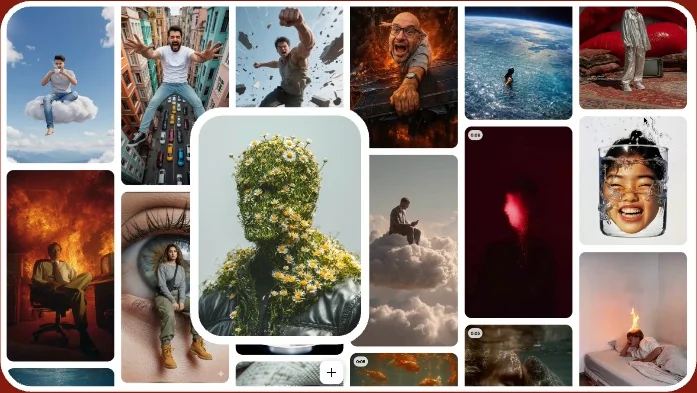
    Pick an effect image on Pinterest
  2. Step 2 · Nano Banana Pro

    Generate in Nano Banana Pro

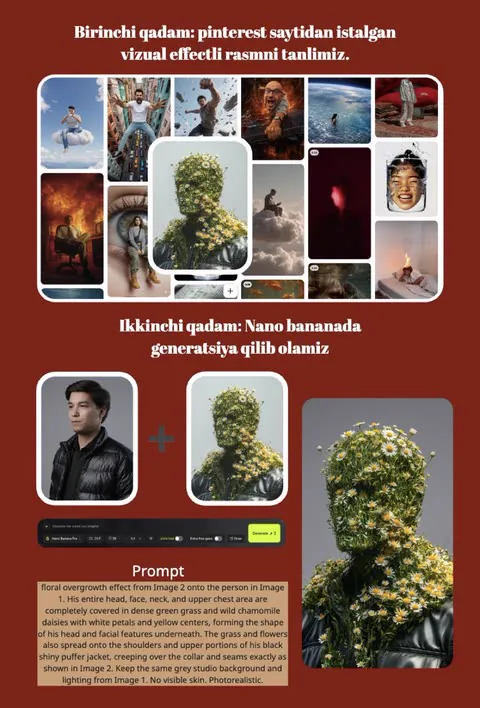
    Upload your own photo (Image 1) and the effect image (Image 2) to Nano Banana Pro, paste the “Nano Banana Pro prompt” below and generate.
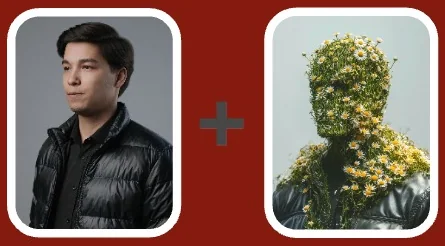
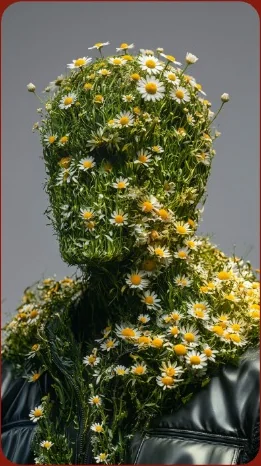
    Generate in Nano Banana ProGenerate in Nano Banana Pro
  3. Step 3 · Kling 3.0

    Bring the image to life in Kling 3.0

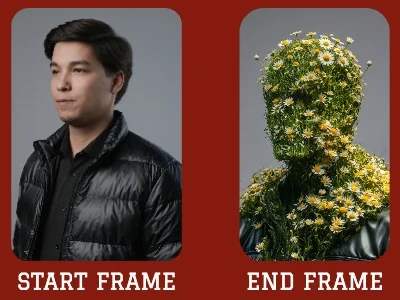
    Animate your images in Kling 3.0. In Create Video, upload your photo to Start Frame and the Nano Banana result to End Frame, then paste the “Kling 3.0 prompt” below. Settings: 15s, 9:16, 1080p.
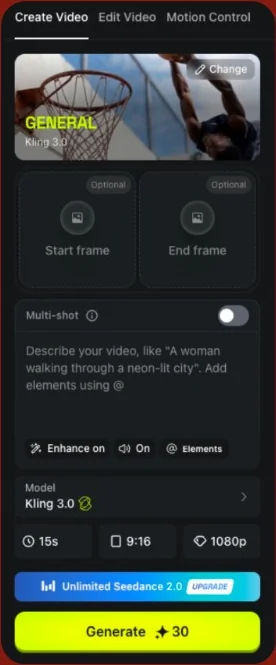
    Bring the image to life in Kling 3.0Bring the image to life in Kling 3.0
Full guide (PDF)Open
Nano Banana Pro prompt

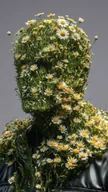
floral overgrowth effect from Image 2 onto the person in Image 1. His entire head, face, neck, and upper chest area are completely covered in dense green grass and wild chamomile daisies with white petals and yellow centers, forming the shape of his head and facial features underneath. The grass and flowers also spread onto the shoulders and upper portions of his black shiny puffer jacket, creeping over the collar and seams exactly as shown in Image 2. Keep the same grey studio background and lighting from Image 1. No visible skin. Photorealistic.

Kling 3.0 prompt (Start + End Frame)

Static medium close-up, then the camera begins a SLOW 360° CLOCKWISE ORBITAL rotation around his head in CINEMATIC MACRO. As the camera orbits past his ear, tiny green grass blades start sprouting from the collar and shoulders of his black puffer jacket in slow-motion at 20% speed. The camera continues orbiting — reaching his profile view, grass spreads upward from the jacket onto his neck, individual stems pushing through fabric in extreme macro detail. Daisies begin blooming along his jawline, white petals unfurling slowly. The camera completes its orbit — now his entire face is being consumed by thick grass and wildflowers growing in real-time, covering eyes, nose, mouth. The orbital camera never stops rotating. Final position: full grass and daisy sculpture head, the jacket partially overgrown. Continuous smooth orbit throughout, shallow depth of field, photorealistic macro cinematography.

Learn to make videos like these step by step — 15 lessons in the mini-course, in Uzbek.

About the mini-course
← All resources

Put a Pinterest visual effect on yourself

Put a visual effect you saw on Pinterest on yourself: the image in Nano Banana Pro, the animation in Kling 3.0. Result: your effect video is ready. Pictures for every step and the Nano Banana Pro and Kling 3.0 prompts are below.

Want to learn this properly? Mini-course

Resources

Step by step

  1. Step 1 · Pinterest

    Pick an effect image on Pinterest

    Pick any image with a visual effect on Pinterest.

    Pick an effect image on Pinterest
  2. Step 2 · Nano Banana Pro

    Generate in Nano Banana Pro

    Upload your own photo (Image 1) and the effect image (Image 2) to Nano Banana Pro, paste the “Nano Banana Pro prompt” below and generate.

    Generate in Nano Banana ProGenerate in Nano Banana Pro
  3. Step 3 · Kling 3.0

    Bring the image to life in Kling 3.0

    Animate your images in Kling 3.0. In Create Video, upload your photo to Start Frame and the Nano Banana result to End Frame, then paste the “Kling 3.0 prompt” below. Settings: 15s, 9:16, 1080p.
    Bring the image to life in Kling 3.0Bring the image to life in Kling 3.0
Full guide (PDF)Open
Nano Banana Pro prompt

floral overgrowth effect from Image 2 onto the person in Image 1. His entire head, face, neck, and upper chest area are completely covered in dense green grass and wild chamomile daisies with white petals and yellow centers, forming the shape of his head and facial features underneath. The grass and flowers also spread onto the shoulders and upper portions of his black shiny puffer jacket, creeping over the collar and seams exactly as shown in Image 2. Keep the same grey studio background and lighting from Image 1. No visible skin. Photorealistic.

Kling 3.0 prompt (Start + End Frame)

Static medium close-up, then the camera begins a SLOW 360° CLOCKWISE ORBITAL rotation around his head in CINEMATIC MACRO. As the camera orbits past his ear, tiny green grass blades start sprouting from the collar and shoulders of his black puffer jacket in slow-motion at 20% speed. The camera continues orbiting — reaching his profile view, grass spreads upward from the jacket onto his neck, individual stems pushing through fabric in extreme macro detail. Daisies begin blooming along his jawline, white petals unfurling slowly. The camera completes its orbit — now his entire face is being consumed by thick grass and wildflowers growing in real-time, covering eyes, nose, mouth. The orbital camera never stops rotating. Final position: full grass and daisy sculpture head, the jacket partially overgrown. Continuous smooth orbit throughout, shallow depth of field, photorealistic macro cinematography.

Learn to make videos like these step by step — 15 lessons in the mini-course, in Uzbek.

About the mini-course