← Barcha materiallar

Higgsfield × Kling 3.0 — Kino kadr workflow

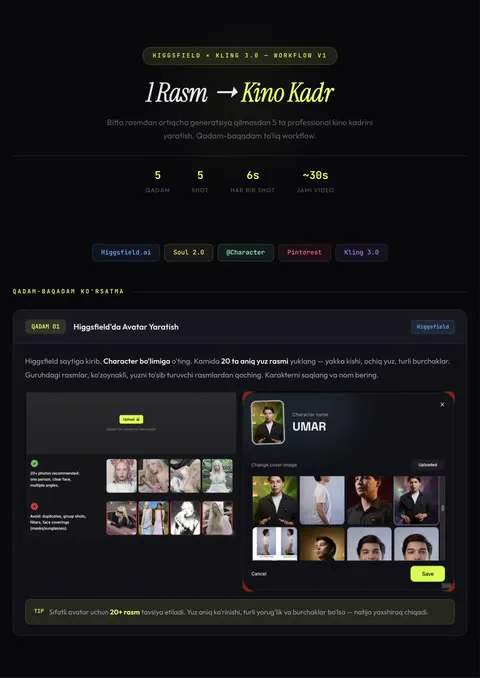
🎬 Bitta rasmdan 5 ta kino kadr Bitta rasmdan ortiqcha generatsiya qilmasdan 5 ta professional kino kadrini yasash. Qadam-baqadam to‘liq workflow. 1-QADAM — Higgsfield’da avatar Higgsfield → Character bo‘limiga o‘ting. Kamida 20 ta aniq yuz rasmi yuklang (yakka kishi, ochiq yuz, turli burchaklar). Karakterni saqlab, nom bering. 2-QADAM — Pinterest’dan referans Pinterest’dan vizual effektli yoki kayfiyatli rasm tanlang — bu videoning umumiy atmosferasini belgilaydi. 3-QADAM — Higgsfield Soul 2.0 Higgsfield → Image bo‘limidan “Soul 2.0” modelini tanlang. 4-QADAM — Referans + avatar → rasm Soul 2.0’ga Pinterest rasmini yuklab, Character’dan avataringizni qo‘shing. 9:16 formatni tanlab, GENERATE bosing. Chiqqan rasm barcha shotlar uchun start frame bo‘ladi. 5-QADAM — Kling 3.0 Multi-Shot Kling 3.0 → Create Video. Start Frame’ga Soul 2.0 rasmini yuklang. Multi-Shot → Custom’ni yoqib, har bir panelga alohida prompt yozing. ✅ Natija: bitta rasmdan 5 ta konsistent kino kadr (~30s video). 📄 To‘liq workflow, 5 ta shot prompti va global negative prompt — pastdagi PDF’da.

Shunday videolarni tizimli o‘rganmoqchimisiz? Mini-kurs →

Manbalar
To‘liq workflow (PDF)Ochish
Shot 01 prompti — Establishing

REFERENCE Use the first image as the start frame. Keep environment: desk, chair, CRT computer exactly the same. CHARACTER @character (face, hair, hands) CAMERA starts wide. Slowly moves forward (dolly in). Character sits calmly. DETAILS Grass slightly moving in the wind. Calm atmosphere. CAMERA Smooth forward movement. Fully stabilized. No shake.

Shot 02 prompti — Side Working

REFERENCE Same environment continues. CHARACTER @character ACTION Side angle shot. Character working on computer. Minimal movement. CAMERA Static. EMOTION Focused. Calm.

Shot 03 prompti — Typing Hands

REFERENCE Keyboard must match first image computer style. CHARACTER @character (hands) ACTION Hands typing on keyboard. Natural finger movement. CAMERA Static. Close-up.

Shot 04 prompti — Mouse Action

REFERENCE Mouse must match first image setup. CHARACTER @character (hand) ACTION Hand moves mouse slightly to the left. Then performs a click. CAMERA Static. Close-up.

Shot 05 prompti — Eyes Close-Up

CHARACTER @character ACTION Extreme close-up of eyes. Character looking forward. EMOTION Serious. Focused. Analytical. CAMERA Static. Shallow depth of field.

Global negative prompt (barcha shotlarga)

no camera shake no glitches no modern computer no environment change no lighting change no extra objects no face distortion no identity change

← Barcha materiallar

Higgsfield × Kling 3.0 — Kino kadr workflow

🎬 Bitta rasmdan 5 ta kino kadr Bitta rasmdan ortiqcha generatsiya qilmasdan 5 ta professional kino kadrini yasash. Qadam-baqadam to‘liq workflow. 1-QADAM — Higgsfield’da avatar Higgsfield → Character bo‘limiga o‘ting. Kamida 20 ta aniq yuz rasmi yuklang (yakka kishi, ochiq yuz, turli burchaklar). Karakterni saqlab, nom bering. 2-QADAM — Pinterest’dan referans Pinterest’dan vizual effektli yoki kayfiyatli rasm tanlang — bu videoning umumiy atmosferasini belgilaydi. 3-QADAM — Higgsfield Soul 2.0 Higgsfield → Image bo‘limidan “Soul 2.0” modelini tanlang. 4-QADAM — Referans + avatar → rasm Soul 2.0’ga Pinterest rasmini yuklab, Character’dan avataringizni qo‘shing. 9:16 formatni tanlab, GENERATE bosing. Chiqqan rasm barcha shotlar uchun start frame bo‘ladi. 5-QADAM — Kling 3.0 Multi-Shot Kling 3.0 → Create Video. Start Frame’ga Soul 2.0 rasmini yuklang. Multi-Shot → Custom’ni yoqib, har bir panelga alohida prompt yozing. ✅ Natija: bitta rasmdan 5 ta konsistent kino kadr (~30s video). 📄 To‘liq workflow, 5 ta shot prompti va global negative prompt — pastdagi PDF’da.

Shunday videolarni tizimli o‘rganmoqchimisiz? Mini-kurs →

Manbalar

To‘liq workflow (PDF)Ochish
Shot 01 prompti — Establishing

REFERENCE Use the first image as the start frame. Keep environment: desk, chair, CRT computer exactly the same. CHARACTER @character (face, hair, hands) CAMERA starts wide. Slowly moves forward (dolly in). Character sits calmly. DETAILS Grass slightly moving in the wind. Calm atmosphere. CAMERA Smooth forward movement. Fully stabilized. No shake.

Shot 02 prompti — Side Working

REFERENCE Same environment continues. CHARACTER @character ACTION Side angle shot. Character working on computer. Minimal movement. CAMERA Static. EMOTION Focused. Calm.

Shot 03 prompti — Typing Hands

REFERENCE Keyboard must match first image computer style. CHARACTER @character (hands) ACTION Hands typing on keyboard. Natural finger movement. CAMERA Static. Close-up.

Shot 04 prompti — Mouse Action

REFERENCE Mouse must match first image setup. CHARACTER @character (hand) ACTION Hand moves mouse slightly to the left. Then performs a click. CAMERA Static. Close-up.

Shot 05 prompti — Eyes Close-Up

CHARACTER @character ACTION Extreme close-up of eyes. Character looking forward. EMOTION Serious. Focused. Analytical. CAMERA Static. Shallow depth of field.

Global negative prompt (barcha shotlarga)

no camera shake no glitches no modern computer no environment change no lighting change no extra objects no face distortion no identity change