← Все материалы

Видео из фото в CapCut: ИИ-супергерой

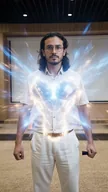
Краткое руководство по созданию ИИ-видео Сегодня разберём, как создать ИИ-видео из своей фотографии в CapCut. ШАГ 1 Откройте приложение CapCut. Затем нажмите «AI Video Generation» и выберите функцию «AI Video». ШАГ 2 Загрузите свою фотографию. Затем вставьте промпт ниже и установите настройки, как показано в видео. (Промпт ниже — «Промпт для видео в CapCut».) ШАГ 3 Сгенерируйте видео и дождитесь результата. Поздравляю! Ваше ИИ-видео готово.

Хотите научиться системно? Мини-курс

Материалы

Промпт для видео в CapCut

Use @image1 as the identity reference for the main character. The superhero must have the same face, hairstyle, glasses, and overall identity as the man in @image1. Preserve his recognizable facial features while transforming him into a realistic live-action superhero. A man based on @image1 stands as the main hero. He begins transforming into a superhero: glowing energy surrounds his entire body, realistic transformation effect, subtle muscle enhancement, and a sleek superhero suit dynamically forms around him. The transformation feels powerful, cinematic, and realistic, with energy particles, light streaks, and slow-motion detail. Then he suddenly launches forward and flies directly toward the camera. Show a close-up shot of his face, with an intense and determined expression. Wind strongly pushes his hair and clothes backward, realistic motion blur, dramatic lighting, and high-speed cinematic movement. The camera then smoothly transitions behind him as he continues flying over a vast open ocean. Wide cinematic shot, reflective water surface, realistic scale, atmospheric depth, epic flying motion. Suddenly, the ocean violently erupts. Massive waves explode upward, water bursts into the air, and a colossal sea monster emerges from the depths. The creature is extremely large, mountain-scale, with dark textured skin, glowing eyes, water cascading off its body, realistic wet details, and terrifying presence. The camera pulls back to reveal the enormous scale. The superhero based on @image1 hovers in mid-air directly in front of the creature. Both face each other in an intense standoff, tension building. Storm clouds rapidly form overhead, lightning strikes around them, epic blockbuster atmosphere, volumetric lighting, realistic water physics, dramatic sky, high realism, ultra detailed, cinematic action scene, 4K quality. Style: live-action cinematic realism, blockbuster superhero movie, ultra realistic, dramatic composition, realistic physics, polished VFX, high detail. Negative prompt: cartoon, anime, low detail, blurry face, distorted face, extra limbs, wrong identity, different person, deformed hands, bad anatomy, low quality, unrealistic water, flat lighting, duplicate body parts, broken glasses, face change.

Научитесь делать такие видео шаг за шагом — 15 уроков в мини-курсе, на узбекском языке.

О мини-курсе
Урок 823 урока
Урок 1Нейросеть для учителей: ИИ-видео для уроков истории, химии и анатомииУрок 2ИИ-реклама за 1$, 100$ и 1000$: видео с нейросетьюУрок 3Новые ракурсы из одного дубля — переносим камеру с помощью ИИУрок 4Стикеры для Telegram через ChatGPT из своего фотоУрок 5Что умеет нейросеть? Видео, мультфильмы, рекламаУрок 6Gemini Omni Flash: как делать видео в GeminiУрок 7Трендовое видео в любой локацииУрок 8Видео из фото в CapCut: ИИ-супергеройУрок 9Трендовое видео о детстве с помощью ИИУрок 10Сменить фон видео нейросетью: BeeBle SwitchУрок 11Как добавить себя в фильм нейросетью — трендовое видеоУрок 12Обнять себя в детстве — трендовое видеоУрок 13Трендовое видео с метеоритом вместе с партнёромУрок 14Тренд «видео на матче»: фанат в камере стадионаУрок 15Прилетите в аэропорт как звезда с Seedance 2.0Урок 16Сделайте свои видео креативными с одним промптом в Seedance 2.0Урок 17Higgsfield: как пользоваться — кинокадры с Kling 3.0Урок 18Превратите обычное видео в Golden HourУрок 19Станьте героем кино с одним промптом в SeedanceУрок 20Перенесите визуальный эффект из Pinterest на себяУрок 21Higgsfield Mixed Media — от полёта пчелы до кинокадраУрок 22Остановка времени: эффект в Veo 3.1 и Nano Banana ProУрок 23Как состарить себя на видео: Nano Banana + Kling
← Все материалы
Урок 823 урока
Урок 1Нейросеть для учителей: ИИ-видео для уроков истории, химии и анатомииУрок 2ИИ-реклама за 1$, 100$ и 1000$: видео с нейросетьюУрок 3Новые ракурсы из одного дубля — переносим камеру с помощью ИИУрок 4Стикеры для Telegram через ChatGPT из своего фотоУрок 5Что умеет нейросеть? Видео, мультфильмы, рекламаУрок 6Gemini Omni Flash: как делать видео в GeminiУрок 7Трендовое видео в любой локацииУрок 8Видео из фото в CapCut: ИИ-супергеройУрок 9Трендовое видео о детстве с помощью ИИУрок 10Сменить фон видео нейросетью: BeeBle SwitchУрок 11Как добавить себя в фильм нейросетью — трендовое видеоУрок 12Обнять себя в детстве — трендовое видеоУрок 13Трендовое видео с метеоритом вместе с партнёромУрок 14Тренд «видео на матче»: фанат в камере стадионаУрок 15Прилетите в аэропорт как звезда с Seedance 2.0Урок 16Сделайте свои видео креативными с одним промптом в Seedance 2.0Урок 17Higgsfield: как пользоваться — кинокадры с Kling 3.0Урок 18Превратите обычное видео в Golden HourУрок 19Станьте героем кино с одним промптом в SeedanceУрок 20Перенесите визуальный эффект из Pinterest на себяУрок 21Higgsfield Mixed Media — от полёта пчелы до кинокадраУрок 22Остановка времени: эффект в Veo 3.1 и Nano Banana ProУрок 23Как состарить себя на видео: Nano Banana + Kling

Видео из фото в CapCut: ИИ-супергерой

Краткое руководство по созданию ИИ-видео Сегодня разберём, как создать ИИ-видео из своей фотографии в CapCut. ШАГ 1 Откройте приложение CapCut. Затем нажмите «AI Video Generation» и выберите функцию «AI Video». ШАГ 2 Загрузите свою фотографию. Затем вставьте промпт ниже и установите настройки, как показано в видео. (Промпт ниже — «Промпт для видео в CapCut».) ШАГ 3 Сгенерируйте видео и дождитесь результата. Поздравляю! Ваше ИИ-видео готово.

Хотите научиться системно? Мини-курс

Материалы

Промпт для видео в CapCut

Use @image1 as the identity reference for the main character. The superhero must have the same face, hairstyle, glasses, and overall identity as the man in @image1. Preserve his recognizable facial features while transforming him into a realistic live-action superhero. A man based on @image1 stands as the main hero. He begins transforming into a superhero: glowing energy surrounds his entire body, realistic transformation effect, subtle muscle enhancement, and a sleek superhero suit dynamically forms around him. The transformation feels powerful, cinematic, and realistic, with energy particles, light streaks, and slow-motion detail. Then he suddenly launches forward and flies directly toward the camera. Show a close-up shot of his face, with an intense and determined expression. Wind strongly pushes his hair and clothes backward, realistic motion blur, dramatic lighting, and high-speed cinematic movement. The camera then smoothly transitions behind him as he continues flying over a vast open ocean. Wide cinematic shot, reflective water surface, realistic scale, atmospheric depth, epic flying motion. Suddenly, the ocean violently erupts. Massive waves explode upward, water bursts into the air, and a colossal sea monster emerges from the depths. The creature is extremely large, mountain-scale, with dark textured skin, glowing eyes, water cascading off its body, realistic wet details, and terrifying presence. The camera pulls back to reveal the enormous scale. The superhero based on @image1 hovers in mid-air directly in front of the creature. Both face each other in an intense standoff, tension building. Storm clouds rapidly form overhead, lightning strikes around them, epic blockbuster atmosphere, volumetric lighting, realistic water physics, dramatic sky, high realism, ultra detailed, cinematic action scene, 4K quality. Style: live-action cinematic realism, blockbuster superhero movie, ultra realistic, dramatic composition, realistic physics, polished VFX, high detail. Negative prompt: cartoon, anime, low detail, blurry face, distorted face, extra limbs, wrong identity, different person, deformed hands, bad anatomy, low quality, unrealistic water, flat lighting, duplicate body parts, broken glasses, face change.

Научитесь делать такие видео шаг за шагом — 15 уроков в мини-курсе, на узбекском языке.

О мини-курсе