← Все материалы

Higgsfield Mixed Media — от полёта пчелы до кинокадра

От полёта пчелы до кинокадра: реалистичная съёмка и эффект в стиле комикса в одном видео — с помощью Nano Banana Pro, Kling 3.0 и Higgsfield Mixed Media. ШАГ 1 Подберите референсные изображения и сгенерируйте их в Nano Banana Pro. Чтобы заменить объект на изображении, используйте «Промпт для Nano Banana Pro» ниже — впишите свои варианты вместо [OBJECT TO REMOVE] и [NEW OBJECT DESCRIPTION]. ШАГ 2 Kling 3.0 → Create Video. Загрузите изображения в Start Frame и End Frame и вставьте «Промпт для Kling 3.0» ниже. Настройки: 15s, 9:16, 1080p. ШАГ 3 Откройте в Higgsfield раздел Mixed Media. Загрузите своё видео (1–10 секунд), выберите понравившийся визуальный эффект и нажмите «Generate». ШАГ 4 Когда видео будут готовы, смонтируйте их. Полное руководство, изображения и настройки — в PDF ниже.

Хотите научиться системно? Мини-курс

Материалы
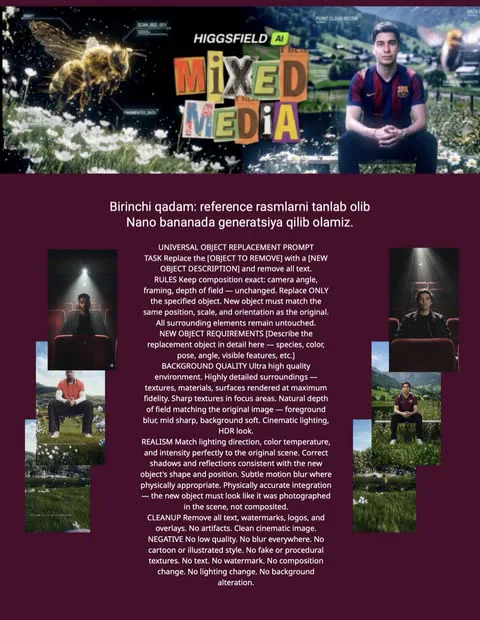
Полное руководство (PDF)Открыть
Промпт для Nano Banana Pro

UNIVERSAL OBJECT REPLACEMENT PROMPT TASK Replace the [OBJECT TO REMOVE] with a [NEW OBJECT DESCRIPTION] and remove all text. RULES Keep composition exact: camera angle, framing, depth of field — unchanged. Replace ONLY the specified object. New object must match the same position, scale, and orientation as the original. All surrounding elements remain untouched. NEW OBJECT REQUIREMENTS [Describe the replacement object in detail here — species, color, pose, angle, visible features, etc.] BACKGROUND QUALITY Ultra high quality environment. Highly detailed surroundings — textures, materials, surfaces rendered at maximum fidelity. Sharp textures in focus areas. Natural depth of field matching the original image — foreground blur, mid sharp, background soft. Cinematic lighting, HDR look. REALISM Match lighting direction, color temperature, and intensity perfectly to the original scene. Correct shadows and reflections consistent with the new object's shape and position. Subtle motion blur where physically appropriate. Physically accurate integration — the new object must look like it was photographed in the scene, not composited. CLEANUP Remove all text, watermarks, logos, and overlays. No artifacts. Clean cinematic image. NEGATIVE No low quality. No blur everywhere. No cartoon or illustrated style. No fake or procedural textures. No text. No watermark. No composition change. No lighting change. No background alteration.

Промпт для Kling 3.0 (Start + End Frame)

KLING 3.0 START FRAME END FRAME. POV shot. Camera rigidly locked on the seated man, perfectly centered, no camera movement. The man stays 100% sharp when in focus. START A realistic honey bee (back view) is hovering low above the water in front of the scene. Focus is on the bee (sharp), background and man slightly blurred. PRE-FLIGHT Subtle vibration only on the bee. Environment natural and still. Focus remains locked on the bee. TAKEOFF The bee accelerates forward toward the man. Focus continues tracking the bee (bee sharp, environment blurred). FLIGHT The bee flies fast through grass and flowers. When reaching dense bushes, the vegetation DOES NOT open or separate automatically. The bee navigates ONLY through existing natural gaps between leaves and branches. Leaves and flowers react strictly from real physical interaction and airflow only: slight bending on contact soft elastic deformation micro delay (natural inertia) before movement subtle secondary motion after contact gentle return to original position with natural damping no path clearing no automatic opening Add micro physics realism: small leaf lag and follow-through motion tiny vibration after contact subtle variation in movement (not uniform) realistic weight and stiffness differences between leaves Strong foreground–midground–background parallax. Only environment motion blur, the bee stays perfectly sharp. FOCUS SHIFT (IMPORTANT) As the bee exits the bushes and flies to the right side of the frame, focus smoothly transitions from the bee to the man. FINAL The bee continues flying to the right side, becoming slightly out of focus. The man becomes fully sharp and in focus, centered and still. STYLE Ultra-realistic Single continuous shot Natural cinematic focus pull NEGATIVE No camera movement No plant auto-opening No subject blur when in focus No unrealistic focus jump No transformation

Урок 1921 урок
Урок 1Новые ракурсы из одного дубля — переносим камеру с помощью ИИУрок 2Создайте свои стикеры для Telegram с помощью ChatGPTУрок 3Что можно делать с помощью ИИ?Урок 4Руководство по Gemini Omni FlashУрок 5Трендовое видео в любой локацииУрок 6Создайте ИИ-видео с супергероем из своей фотографииУрок 7Трендовое видео о детстве с помощью ИИУрок 8С помощью ИИ можно менять фон!Урок 9Добавьте себя в любой кадр из фильма — трендовое видеоУрок 10Встреча с собой в детстве — трендовое видеоУрок 11Трендовое видео с метеоритом вместе с партнёромУрок 12Фанат, случайно попавший в камеру на футболе — трендовое видеоУрок 13Прилетите в аэропорт как звезда с Seedance 2.0Урок 14Сделайте свои видео креативными с одним промптом в Seedance 2.0Урок 15Higgsfield × Kling 3.0 — пошаговое создание кинокадровУрок 16Превратите обычное видео в Golden HourУрок 17Станьте героем кино с одним промптом в SeedanceУрок 18Перенесите визуальный эффект из Pinterest на себяУрок 19Higgsfield Mixed Media — от полёта пчелы до кинокадраУрок 20Останавливаем время с помощью нейросетейУрок 21Посмотрите на себя в 80 лет с помощью ИИ
← Все материалы
Урок 1921 урок
Урок 1Новые ракурсы из одного дубля — переносим камеру с помощью ИИУрок 2Создайте свои стикеры для Telegram с помощью ChatGPTУрок 3Что можно делать с помощью ИИ?Урок 4Руководство по Gemini Omni FlashУрок 5Трендовое видео в любой локацииУрок 6Создайте ИИ-видео с супергероем из своей фотографииУрок 7Трендовое видео о детстве с помощью ИИУрок 8С помощью ИИ можно менять фон!Урок 9Добавьте себя в любой кадр из фильма — трендовое видеоУрок 10Встреча с собой в детстве — трендовое видеоУрок 11Трендовое видео с метеоритом вместе с партнёромУрок 12Фанат, случайно попавший в камеру на футболе — трендовое видеоУрок 13Прилетите в аэропорт как звезда с Seedance 2.0Урок 14Сделайте свои видео креативными с одним промптом в Seedance 2.0Урок 15Higgsfield × Kling 3.0 — пошаговое создание кинокадровУрок 16Превратите обычное видео в Golden HourУрок 17Станьте героем кино с одним промптом в SeedanceУрок 18Перенесите визуальный эффект из Pinterest на себяУрок 19Higgsfield Mixed Media — от полёта пчелы до кинокадраУрок 20Останавливаем время с помощью нейросетейУрок 21Посмотрите на себя в 80 лет с помощью ИИ

Higgsfield Mixed Media — от полёта пчелы до кинокадра

От полёта пчелы до кинокадра: реалистичная съёмка и эффект в стиле комикса в одном видео — с помощью Nano Banana Pro, Kling 3.0 и Higgsfield Mixed Media. ШАГ 1 Подберите референсные изображения и сгенерируйте их в Nano Banana Pro. Чтобы заменить объект на изображении, используйте «Промпт для Nano Banana Pro» ниже — впишите свои варианты вместо [OBJECT TO REMOVE] и [NEW OBJECT DESCRIPTION]. ШАГ 2 Kling 3.0 → Create Video. Загрузите изображения в Start Frame и End Frame и вставьте «Промпт для Kling 3.0» ниже. Настройки: 15s, 9:16, 1080p. ШАГ 3 Откройте в Higgsfield раздел Mixed Media. Загрузите своё видео (1–10 секунд), выберите понравившийся визуальный эффект и нажмите «Generate». ШАГ 4 Когда видео будут готовы, смонтируйте их. Полное руководство, изображения и настройки — в PDF ниже.

Хотите научиться системно? Мини-курс

Материалы

Полное руководство (PDF)Открыть
Промпт для Nano Banana Pro

UNIVERSAL OBJECT REPLACEMENT PROMPT TASK Replace the [OBJECT TO REMOVE] with a [NEW OBJECT DESCRIPTION] and remove all text. RULES Keep composition exact: camera angle, framing, depth of field — unchanged. Replace ONLY the specified object. New object must match the same position, scale, and orientation as the original. All surrounding elements remain untouched. NEW OBJECT REQUIREMENTS [Describe the replacement object in detail here — species, color, pose, angle, visible features, etc.] BACKGROUND QUALITY Ultra high quality environment. Highly detailed surroundings — textures, materials, surfaces rendered at maximum fidelity. Sharp textures in focus areas. Natural depth of field matching the original image — foreground blur, mid sharp, background soft. Cinematic lighting, HDR look. REALISM Match lighting direction, color temperature, and intensity perfectly to the original scene. Correct shadows and reflections consistent with the new object's shape and position. Subtle motion blur where physically appropriate. Physically accurate integration — the new object must look like it was photographed in the scene, not composited. CLEANUP Remove all text, watermarks, logos, and overlays. No artifacts. Clean cinematic image. NEGATIVE No low quality. No blur everywhere. No cartoon or illustrated style. No fake or procedural textures. No text. No watermark. No composition change. No lighting change. No background alteration.

Промпт для Kling 3.0 (Start + End Frame)

KLING 3.0 START FRAME END FRAME. POV shot. Camera rigidly locked on the seated man, perfectly centered, no camera movement. The man stays 100% sharp when in focus. START A realistic honey bee (back view) is hovering low above the water in front of the scene. Focus is on the bee (sharp), background and man slightly blurred. PRE-FLIGHT Subtle vibration only on the bee. Environment natural and still. Focus remains locked on the bee. TAKEOFF The bee accelerates forward toward the man. Focus continues tracking the bee (bee sharp, environment blurred). FLIGHT The bee flies fast through grass and flowers. When reaching dense bushes, the vegetation DOES NOT open or separate automatically. The bee navigates ONLY through existing natural gaps between leaves and branches. Leaves and flowers react strictly from real physical interaction and airflow only: slight bending on contact soft elastic deformation micro delay (natural inertia) before movement subtle secondary motion after contact gentle return to original position with natural damping no path clearing no automatic opening Add micro physics realism: small leaf lag and follow-through motion tiny vibration after contact subtle variation in movement (not uniform) realistic weight and stiffness differences between leaves Strong foreground–midground–background parallax. Only environment motion blur, the bee stays perfectly sharp. FOCUS SHIFT (IMPORTANT) As the bee exits the bushes and flies to the right side of the frame, focus smoothly transitions from the bee to the man. FINAL The bee continues flying to the right side, becoming slightly out of focus. The man becomes fully sharp and in focus, centered and still. STYLE Ultra-realistic Single continuous shot Natural cinematic focus pull NEGATIVE No camera movement No plant auto-opening No subject blur when in focus No unrealistic focus jump No transformation